AUA
android-ui-analyser · open source

Your agent wrote the app. Now it can use it.

AUA shows an AI agent what is on the screen of an Android app, an iOS simulator or a web page as a list of elements with stable IDs. The agent taps and types by ID, sees what happened, and proves its change works.

$uvx aua doctor

CLI and MCP server. Works with Claude Code, Codex and any MCP client. The android in the name is your agent, not the platform.

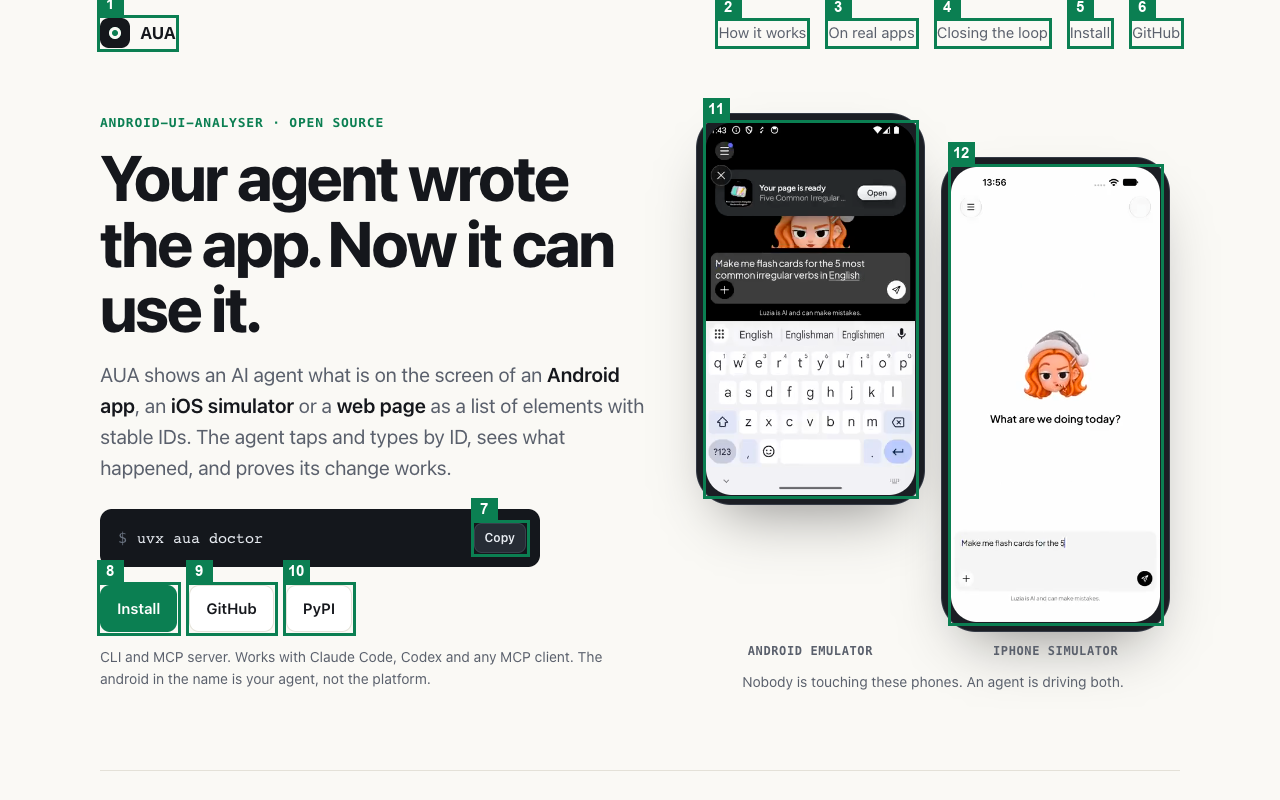
Android emulatoriPhone simulator

Nobody is touching these phones. An agent is driving both.
How it works

Three calls an agent can understand

A screenshot is expensive for an agent to read and still leaves it guessing where to tap. AUA hands it the screen as data.

01 · SEE

Every element, with an ID

Text, type, position and a stable ID for each control. Read from the accessibility tree or the DOM in tens of milliseconds, with OCR and vision for screens that have none.

aua --format compact analyze
02 · ACT

Tap and type by ID

The agent names the element. AUA finds it on the current screen, acts, and returns the screen that follows in the same call.

aua tap-and-analyze <id>
aua input-and-analyze <id> "hello"
03 · PROVE

Evidence, not a claim

Screenshots, screen recordings with the waiting cut out, and a report the agent builds from the run. The recordings on this page were made that way.

aua wait-and-analyze --for "Saved"
aua has "Sign in"   # exit 0 or 1
The top of this page with a numbered box on each of the 12 controls AUA found
The top of this page, as AUA showed it to the agent that built it: 12 controls. The boxes are drawn from the positions AUA returned.
# aua --platform web --format compact analyze
{"id": "el:eff996c9…", "text": "Install", "type": "Link"}
{"id": "el:70b9c052…", "text": "GitHub",  "type": "Link"}
{"id": "el:bbe26e2d…", "text": "Copy",    "type": "Button"}
{"id": "el:eac806f3…", "text": "Install", "type": "Link"}
{"id": "el:76fa0c54…", "text": "GitHub",  "type": "Link"}
{"id": "el:d52f406a…", "text": "PyPI",    "type": "Link"}

# aua --platform web tap-and-analyze el:bbe26e2d…
{"id": "el:86312d86…", "text": "Copied",  "type": "Button"}

Rows 5 to 10 of the answer, with the IDs shortened. The agent asked what was on the screen, tapped box 7 by its ID, and the answer to the tap already showed the button reading "Copied". No screenshot was read and no coordinates were guessed.

On real apps

One feature, checked on both phones

Luzia was adding study cards to its chat. An agent ran the same five flows on the Android app and on the iPhone app with AUA and recorded each one. Pick a flow, then tap a step to jump to it.

Android

emulator · 12 s
  1. Asks for flash cards
  2. Loader while the card is written
  3. Deck shows in the chat
  4. Flip shows the answer
  5. "Got it" moves to the next card

iOS

simulator · 17 s
  1. Asks for flash cards
  2. Loader while the card is written
  3. Deck shows in the chat
  4. Flip shows the answer
  5. "Got it" moves to the next card
FlowAndroidiOS
Flash cardsCard shows, grading worksCard shows, grading works
Study planCard showsCard shows
Practice roundAnswer, end round, follow-upAnswer, end round
HomeworkAll steps, follow-upAll steps, follow-up
Studies screenOpen, grade, back to chatOpen, grade, back to chat
It also caught a bug a quick look would miss. The plan for an exam on 20 December showed "Sat 20 Dec" on both phones. 20 December 2026 is a Sunday: the card had picked the wrong year.

Recorded on the Luzia app for Android and iOS with a guest account and test prompts. The waiting is cut out of each recording; animations play at real speed. The Android emulator is in dark mode and the iPhone simulator in light mode.

Closing the loop

Find the crash, then prove the fix

An agent that can use the app can do more than tick boxes. Here it tested a new character carousel on Android, hit a crash nobody could trigger on purpose, and came back to prove the fix.

01 · DRIVE

8 scenarios

Swipes both ways, opening a chat from a card, rotating the phone, pressing Back in the middle of an animation. 7 passed.

02 · CATCH

Two crashes while idle

The app closed twice while nothing was being touched. The agent could not repeat it on demand, so it read the crash from the device and named a suspect: the tilt effect receiving a value that is not a number.

03 · FIX

A fix goes in

The finding went to the pull request with the recording and the crash, and the code was changed.

04 · PROVE

Old build closes, new one holds

The agent made the emulator's motion sensor report "not a number". The old build closed at once. The fixed build kept drawing for 60 seconds, and stayed up through four idle waits of 60 to 130 seconds.

First run

94 s · both crashes included
  1. Opens the carousel
  2. First swipe
  3. Opens a chat from a card
  4. Crash 1, while idle
  5. Crash 2, while idle
  6. Landscape
  7. Back in mid-animation

Re-check

72 s · fix, then the old build
  1. Fixed build opens
  2. Reopened with animations on
  3. Idle, no crash130 s cut here
  4. Sensor reports "not a number"still drawing
  5. Old build opens
  6. Same sensor value: the app closes

Recorded on the Luzia app on an Android emulator. The second recording is in Portuguese because that is the language the emulator was set to.

On the web

This page was checked the same way

The agent that built this page opened it in Chrome through AUA and used it before showing it to anyone. The first run failed.

What it caught. After the agent tapped "Study plan", AUA's answer still listed the flash-card steps. All five flows were showing at once, because one style rule cancelled the hidden attribute. One line fixed it, and the same check passed on the next run.
CheckHowResult
The copy button copiesTap it by ID; the button reads "Copied"Pass
Each flow tab shows only its own recordingsTap all five tabs; read which steps are on screenPass, after the fix
A step jumps the recording to that momentTap a step; read the player's timePass
Nothing fails to loadAUA's browser report: console errors and failed requestsPass
It fits a phoneOpen at 390 px wide; read each section's positions and screenshotPass
What your agent gets

Built for agents, usable by people

The same commands work in a terminal and over MCP, on all three platforms.

Android, iOS simulator, web

Android devices and emulators from Android 7.0, iOS simulators on macOS, and Chromium, Firefox and WebKit through Playwright.

IDs that survive a redraw

An element keeps its ID while the screen changes around it, so the agent can keep acting without looking again.

The result comes back with the action

Every tap, type and swipe returns the screen that followed. No second call to see what happened.

Wait on state, not on time

Wait for text to appear or the screen to change instead of sleeping and hoping.

Saved flows and known routes

Replay a journey in one call, and jump to a screen the tool has already learned how to reach.

Evidence built in

Screenshots, recordings, logs and a report page, so a person can check what the agent says it did.

Install

Try it in one line

You need uv. For Android you also need adb and a device or emulator.

Run it without installing

uvx aua doctor
uvx aua --format compact analyze

Claude Code plugin

/plugin marketplace add The-Wordlab/Android-UI-Analyser
/plugin install android-ui-analyser@the-wordlab

Codex plugin

codex plugin marketplace add The-Wordlab/Android-UI-Analyser
codex plugin add android-ui-analyser@the-wordlab

Any MCP client

{
  "mcpServers": {
    "android-ui": { "command": "uvx", "args": ["aua", "mcp"] }
  }
}